

I doubt anyone trained you on how to use Veeva Vault. You get access, maybe a quick tutorial from someone who has no idea what you will actually use the system for, and then you’re expected to figure it out. Your day ends at 1 am on the verge of a nervous breakdown still trying to figure out how to send a document for approvals.
I was volunteered to work on a Takeda study back when they were first adopting the system and it was a learning journey for everyone involved. Below is what I discovered through trial and error, frustration and support from colleagues.
This is Part 1 of a two part series. This article is an overview of what Veeva Vault is and how I encountered it while working on Takeda studies. Part 2 will show you a step-by-step guide on how to process escalations.
What It Actually Means to Work on a Takeda Study
Takeda is one of the largest pharmaceutical companies in the world, and within the CRO space, they are a significant client. Not every CRO gets Takeda work, and not every analyst within a CRO gets assigned to it.
From the outside, Takeda looks exactly how you’d expect a global top-ten pharma to look: organized, process-driven, professional – a well-oiled machine. And in many respects that’s accurate. Their documents are thorough, their expectations are documented, their timelines are followed through.
In my experience that also meant that they know precisely what they want and they’re not shy about saying so. The first call on a Takeda project can be a useful recalibration if you have been working with more accommodating sponsors. Their leadership is direct, expectations are stated plainly, sometimes bluntly. If something isn’t right, you’ll hear about it.
What Veeva Vault for Clinical Trials Actually is
At its simplest, Veeva Vault is a cloud-based platform for managing regulated content and workflows. In clinical research, the specific Vault application and configuration you use determine what you can see, what documents you manage, and which workflows you can initiate. It functions as the controlled environment where key study documents (site budgets, payment schedules, and contract amendments) are stored, reviewed, approved, and archived.
The word “controlled” is doing a lot of work in that sentence. Unlike a shared drive or a SharePoint folder where documents can be saved, renamed, overwritten, or deleted with minimal accountability, Vault maintains a full version history and audit trail for every document. Every action is timestamped and attributed to a specific user. For regulated clinical documentation, these controls are important because applicable regulations and quality requirements require organizations to maintain trustworthy, traceable records and appropriate controls over electronic records
The Lifecycle of a Clinical Document in Veeva Vault
Important: Vault is highly configurable. The screens, lifecycle states, workflows, permissions and document types described below reflect the type of setup a budget analyst may encounter and, where specifically noted, my experience working on Takeda studies. Your organization’s Vault environment may look different and the exact lifecycle states vary by configuration, but the basic concept is that documents move through controlled states as they are prepared, reviewed, approved and eventually replaced or archived.
There is a defined workflow that documents move through so it is not always intuitive on where the document currently is or how to move it along. Understanding the basic lifecycle removes most of the confusion.
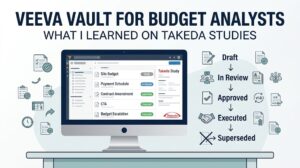
Here’s how a file typically moves through the system:
Draft – The document has been uploaded or created in Vault but hasn’t entered formal review yet. This is usually where you’re working. At this stage, you may still be able to make edits depending on how your organization’s workflow is configured.
In Review – The document has been submitted into a review workflow and is now with one or more reviewers. This might be Legal, Finance, Contracts, or the study team depending on the document type and your organization’s setup. At a large sponsor like Takeda, review workflows often involve multiple stakeholders in sequence or in parallel.
Approved – The document has completed the required internal approval workflow.
Executed – Where applicable, the contractual document has been signed by the required parties and is considered fully executed.
Superseded / Obsolete – Depending on the Vault configuration, these states may indicate that a document or version is no longer the active record because it has been replaced, withdrawn, or otherwise removed from active use.
The most disorienting state to be in is somewhere in the middle – you’ve submitted something, you’re not sure where it is, and you don’t know whether you’re waiting on someone or whether something was rejected and is sitting back in your queue without a notification you noticed.
How to See Where a Document Is
When you open a document in Vault, the document information panel shows you the current lifecycle state. That state name (Draft, In Review, Approved, etc.) is your first orientation point.
For documents that are actively in a workflow, look for the workflow details or active workflow section. This shows you:
- Which workflow the document is currently in
- Which step it’s currently at
- Who the current assignee is – meaning who specifically has the document right now
If the document has already moved through a workflow, the audit trail shows every action taken: who submitted it, who reviewed it, what comments were left, whether it was approved or sent back. This is also where you go if something seems to have disappeared or stalled – the trail will show the last action and who took it.
What is In Your Control as a Budget Analyst
This is important to understand clearly, both for your own sanity and for when colleagues come to you with questions.
What you typically own:
- Uploading the correct version of the budget file into Veeva
- Ensuring naming conventions match what your organization requires – a mislabeled document in a large organization can end up in the wrong workflow or get rejected at intake
- Initiating the workflow once the document is ready for review
- Responding to review comments or revision requests, uploading an updated version, and resubmitting
- Tracking status and following up with the appropriate person when a document has been sitting at a particular step longer than expected
Your job is not to make the entire workflow move. Your job is to make sure the document is accurate, correctly routed, and that the next person has what they need to act.
What is typically not your job:
- Legal review of contract language – you can flag, but you don’t approve
- Final contract execution – signature authority sits with specific roles and that is not the budget analysts
- Changing a document’s lifecycle state outside of what your role permissions allow
- Troubleshooting system-level issues – if something appears genuinely broken, that’s a Vault administrator or IT issue, not a budget problem
This boundary matters when someone comes to you assuming you have full visibility and control over the entire contract process. You don’t, and more importantly, you shouldn’t.
When Things Go Wrong
A document gets uploaded with the wrong version; a workflow gets initiated before the document is ready; someone asks for a revision after approval. These things are expected to happen and it is important not to panic – everything can be fixed, you just need to figure out the correct approach.
A few practical principles:
Do not overwrite an approved document. If an approved document needs to change, follow the configured revision, amendment or replacement process rather than attempting to overwrite the approved record.
Check the audit trail before escalating. If a document seems to have disappeared or stalled, look at the audit trail first. In many cases, the document is with a specific person at a specific workflow step, and that’s the information you need to follow up effectively.
For a budget analyst, the workflow troubleshooting sequence could essentially be:
Document status → workflow → current task/assignee → comments → audit trail → escalation
If you initiated something you shouldn’t have, say so quickly. A workflow that’s been wrongly triggered can usually be cancelled or recalled. The longer it sits incorrectly in someone’s queue, the messier it gets.
Version confusion. If there are two versions of a document floating around and no one is sure which is current, the Vault record is the source of truth.
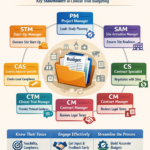
I would highly encourage you to build relationships with the people at each handoff point. Legal, Contract Managers, Site Specialists – each look at your documents from their own perspective and you can serve as a bridge between roles that do not normally communicate, yet whose job is reliant on each other.
If you’re still figuring out who owns what during the budget and contract process, see the IGA Stakeholder Map.
One Last Thing: The Career Angle
Working on a major sponsor account can also have career value. Experience navigating a sponsor’s systems, processes and expectations gives you exposure that is difficult to get from generic training alone. It can also make future sponsor-side opportunities easier to pursue, although there is no guaranteed career path from CRO work to a sponsor role.
For more on where experience as a budget analyst can take you, see the Career Transition Framework I have put together.
Find out who I am and what I am fighting for.
If you agree, disagree, or think this is nonsense, email contact@clinicalbudgets.com
If you’d like me to cover a specific topic, you can suggest it here.